How to Use Math Games Without Losing Teaching Time
Every teacher feels the pressure of the pacing guide. Games only earn a place in class if they do the job of something you'd already be doing, like practice, review or a warm-up, and do it better.
The worry is fair: a game can eat a class period and leave little to show for it. The fix is to treat games as a replacement for practice you already do, not an extra.
Replace, don't add
Look at where your students already practice: the warm-up, the second half of a lesson, review days before a test. A game on the same skill can take that slot. Students get the same practice, often more of it, and you don't lose instruction time.
Match the game to today's lesson
A game only saves time if it practices what you just taught. The free curriculum guide lists the games that fit each unit for every grade, and you can browse games by standard.
Keep setup near zero
- Keep the game file on your desktop so it opens in one click. Fletcher Math games work offline with no logins.
- Use the same team groups for a few weeks so students don't have to regroup every time.
- Stick with a few favorite games so you aren't teaching new rules every day.
Set a time box
Decide up front how long the game runs, whether it's 10 minutes or 20, and stop when time's up, even mid-game. Whoever's ahead wins.
Use review games for test prep
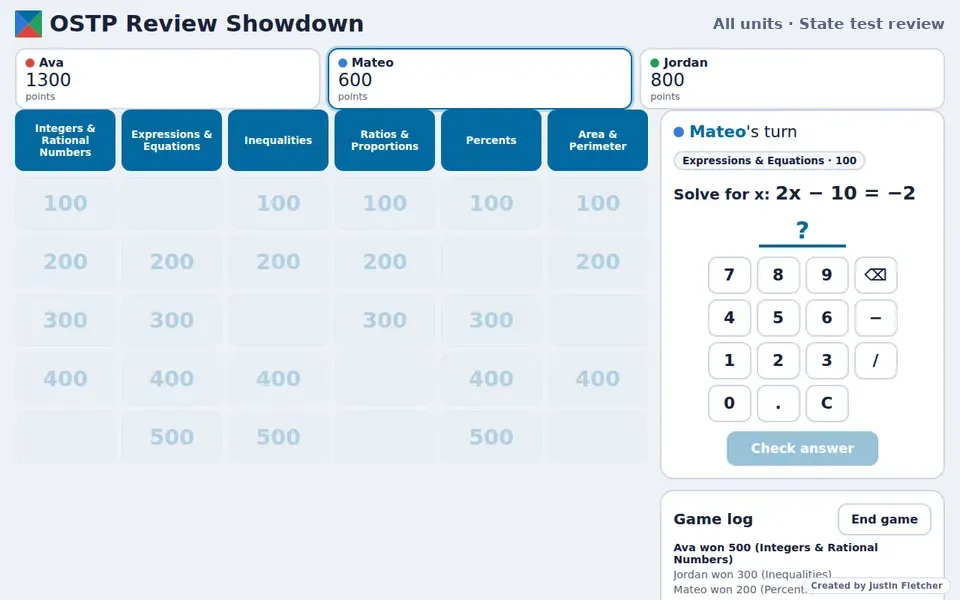
Review days are where games save the most time. Instead of a review packet, a game like OSTP Review Showdown lets you choose the units, and teams play through them. You can see which topics trip students up as it happens.
Common questions
How long should a math game take in class?
Plan for 10 to 20 minutes. Most games can stop whenever you need them to.
How do I know which game fits my lesson?
Use the free curriculum guide or browse games by standard.